Have you ever wondered how viruses spread? Wondered how ecosystems change over time? If you’ve ever been curious as to how any natural phenomena progresses over time, then you’re likely to see some sort of simulation used to explain and demonstrate these situations. What kind of simulation? Well, this is where I introduce the concept of cellular automaton.
According to TechTarget, cellular automaton is “a collection of cells arranged in a grid of specified shape, such that each cell changes state as a function of time, according to a defined set of rules driven by the states of neighbouring cells.”
If none of that made sense, imagine a pixel art animation, except every pixel changes based on the state of the pixel’s neighbouring pixels. These changes all follow a set of “rules” created.
~~ If you’ve already seen my post on “Conway’s Game of Life,” you may be familiar with what I’m talking about. If you haven’t seen that post, make sure to check it out! ~~
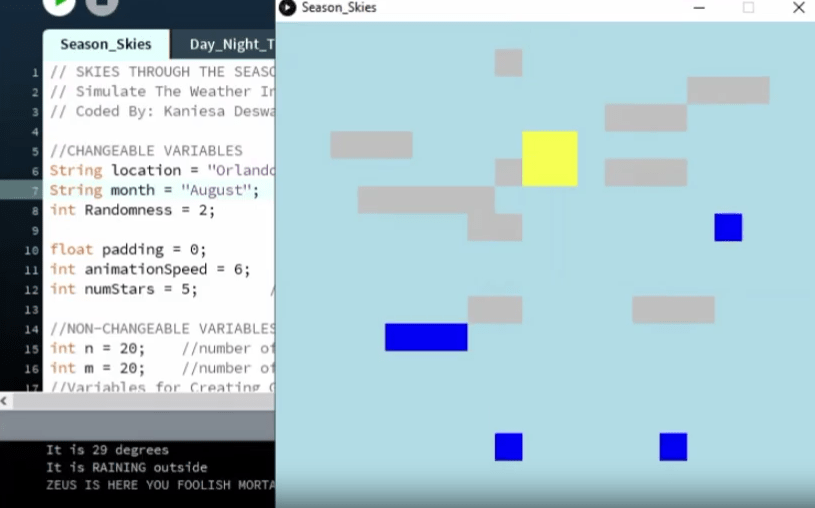
As you may have guessed by now, I created a cellular automaton project using the Processing language that displays the skies over the seasons in three different locations: Waterloo (Canada), Orlando (USA), Tokyo (Japan).
It was a really fun project, based on the design document a friend (yes, the sumo bot partner) made. So while the project was solely coded by me, the rules were determined by both of us. What did my friend do outside of that? Lots! She created a design document detailing our model, explanations on evolution rules, sample diagrams, strength & flaws, and collected our data set. I love working with her ❤
How It Works
While you could definitely get the idea just by watching the animation (see below). However, to be safe, here’s the most important details:
Model Background:
The eternal consequentiality of weather is undeniable. Whether it acts on small-level plans like picnics, or indicates large global issues like climate change, weather directs our lives in large and small scale ways.
Though weather is unpredictable, thanks to technologies like satellites and databases, the weather can be recorded on any given day and we can then eventual fuse the given location’s weather data from that day over years to calculate the likelihood of different weather occurrences happening. This automaton aims to simulate likely weather patterns using this data from three different locations (Waterloo, Orlando, and Tokyo), using unique data sets for each.
This automaton will cycle through daytime and nighttime, continually simulating possible days of weather for a specified month in the location chosen by the user. This automaton will mainly focus on the weather patterns that influence our daily lives, so it will print out the temperature at the beginning of each simulated day, display the cloud cover occurring, and also display if any precipitation is taking place. Of course, there is always some randomness to weather, and the impact of this randomness is adjustable by the user.
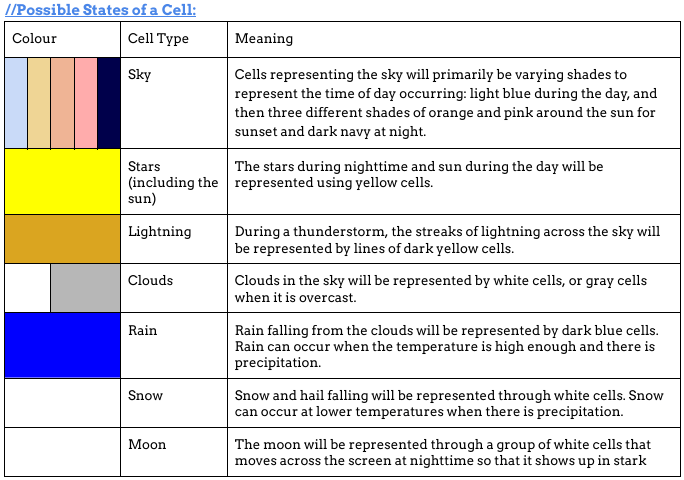
User Controls:
The aim of this automaton is to provide individuals with useful information on weather patterns. Therefore, the information that the user can input to adjust the automaton is as useful and interesting as possible.
The user will have three different city options for the location of the automaton’s simulation: either Waterloo, Orlando, or Tokyo.
The user will also be able to input a chosen amount of randomness/adjust the amount of randomity of the automaton. There will automatically be some amount of randomness occurring associated with the randomity variable within the program due to the unpredictability of weather, but as the randomness increases, the likelihood of unlikely weather occurrences increases. Essentially, what will occur is that if a number between 1-100 randomly picked is within the percentage of randomness provided (ex. if the number 19 is picked and there is a 30% chance of randomness, then the number chosen is between 1-30, and randomness will occur), then all of the statistics (temperature, precipitation, etc.) will be picked randomly without referring to the weather data for the location chosen.
The user can also input how many stars they want to appear in the night sky as a fun additional feature.
The final user control that’s offered is the option to choose what month the automaton is set in. This control’s main purpose is that if the user wants to study the likely weather patterns of a certain month, they can pick it.
Source: our design document (with permission from my partner)
The Project!
Here are two sample videos of the project.
The one on the left simulates Waterloo (Canada) in December. As you may have expected, there’s lots of snow! The one on the right is Orlando during August. The console in both video displays the temperature of each new day and whether there’s precipitation.
How did I ensure the simulation and temperatures were accurate? Well…remember how I said my friend collected the data? I reformatted it into a text file and set up a text file reader in the code. That way, when users enter a location and month, the code finds the data for it!
(How? Well, there is one file for each location. So the code looks for a file titled the same as the location the user entered. Then, it searches that file for the line that has the same month the user entered in. From there, it converts the data written on that line into a list of “items” because each piece of data was divided by a comma. Each item is a data statistic such as humidity, temperature, chance of cloudiness, etc., which determines what the simulation will show)
Reflection
Overall, this was an interesting project. I’ll be honest, it felt a little rushed towards the end. There were other features that would be really cool to have included, ones I will definitely add if I ever come back to this project. However, I think that’s part of the beauty of the project.
It will never be perfect.
No cellular automaton ever will be. Because in the end, the world is not made of little tiny squares. There are a million of factors that exist and aren’t ones we can always account for and anticipate. The best we can do is try to make it as close as we can, close enough to make the accurate predictions we need.
And Season Skies did that perfectly.
 KD Tech Days
Leave a comment